AI Triggers
Automate your development workflow
Define triggers that fire when development summaries arrive. Generate tweets, release notes, documentation—automatically powered by your choice of AI model.
Event-Driven Automation
AI Triggers let you define automated actions that fire when specific development summaries arrive. Whether it's generating tweet drafts from marketing summaries or creating documentation from architect notes—triggers handle it automatically.
- Fire on specific summary types (Marketing, Architect, Product, etc.)
- Customizable prompt templates with variables
- Auto-execute or require approval modes
- Persistent outputs with copy-to-clipboard
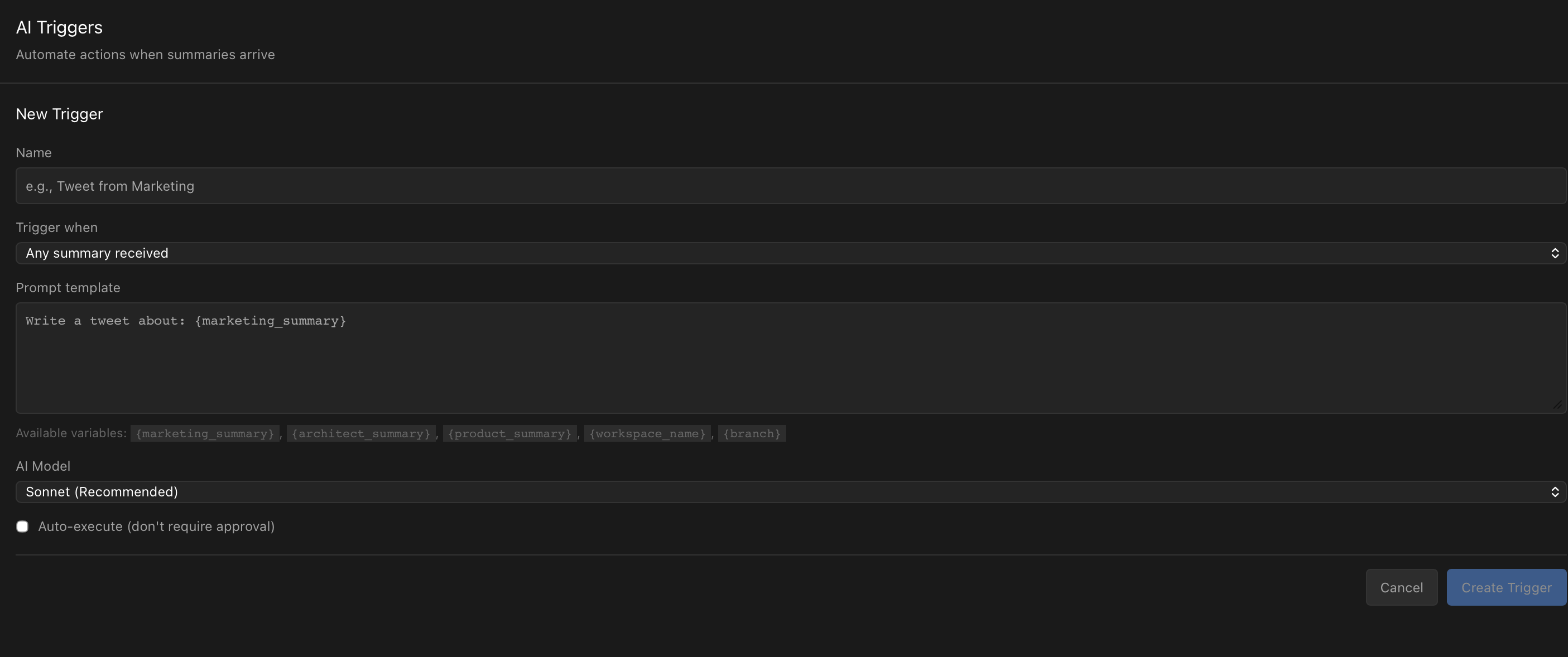
Template Variables
Your prompt templates can use powerful variables that inject real data from your development sessions.
{{marketing_summary}}User-facing progress and business value{{architect_summary}}Technical details and design decisions{{product_summary}}Feature status and user story progress{{workspace_name}}Current workspace name{{branch}}Current Git branchWrite a tweet about:
{{marketing_summary}}
Keep it under 280 characters.AI Model Selection
Pro users can choose which AI model powers each trigger. Match the model to your task—fast Haiku for quick outputs, balanced Sonnet for most tasks, or powerful Opus for complex content generation.
Use Cases
Tweet Generation
Automatically draft tweets from marketing summaries—just review and post.
Release Notes
Generate release notes from product summaries with one trigger.
Documentation
Create technical documentation from architect summaries automatically.
Changelog Updates
Keep your changelog updated with trigger-generated entries.
Automate Your Workflow
Download Sonars and set up your first AI trigger.