Workspace Switcher
Lightning-fast context switching with Cmd/Ctrl+T
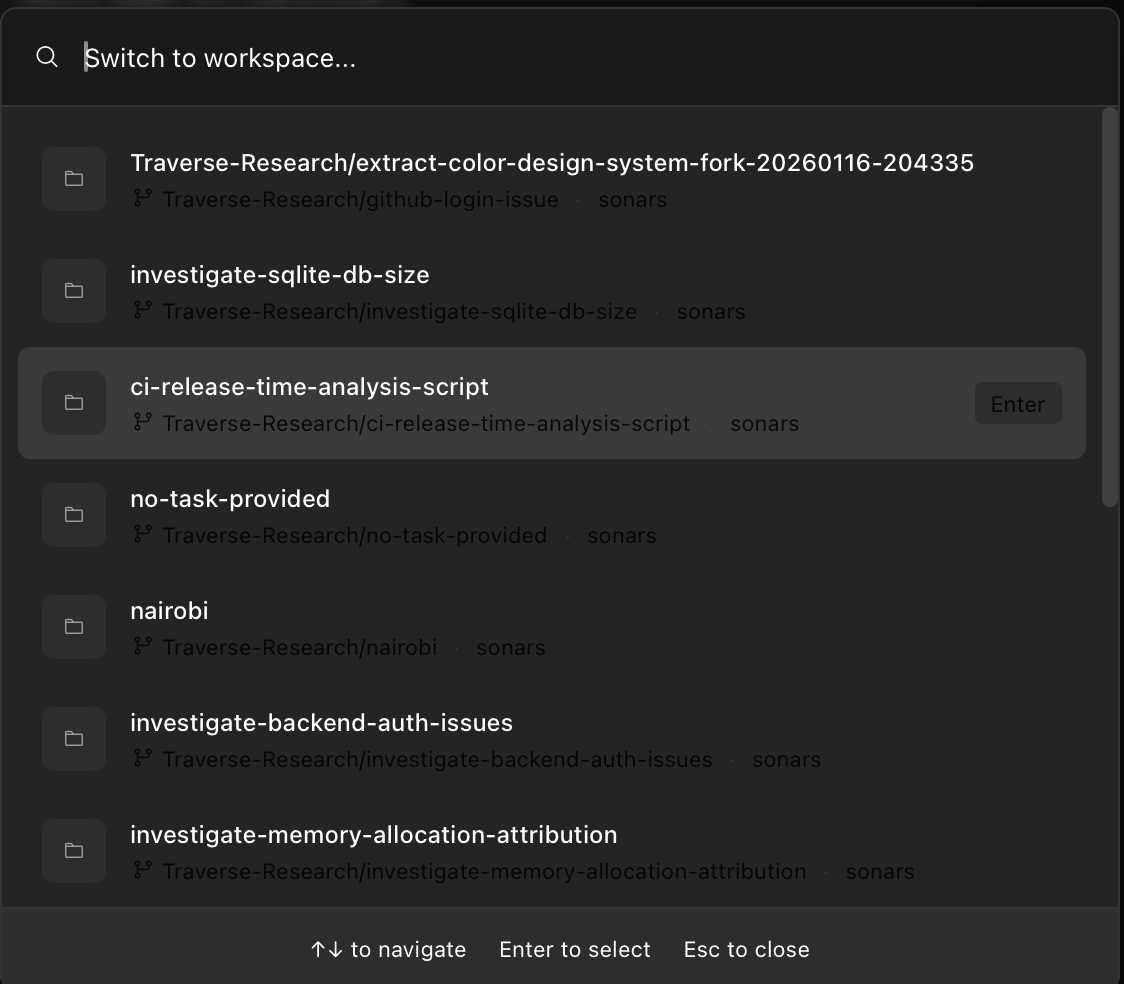
Jump between workspaces instantly with a VS Code-like command palette. Fuzzy search, keyboard navigation, and zero friction.
Instant Access
Press Cmd+T (Mac) or Ctrl+T (Windows/Linux) to open the workspace switcher. Start typing to filter, use arrow keys to navigate, Enter to switch. It's the fastest way to move between projects.
- Global keyboard shortcut
- Fuzzy search matching
- Recently used workspaces first
- Keyboard-first navigation
Cross-Platform Shortcuts
Sonars automatically syncs your keyboard shortcuts across all your devices. Whether you're on Mac, Windows, or Linux, your muscle memory works everywhere.
- Platform-aware key bindings
- Automatic sync across devices
- Customizable shortcuts
- VS Code-inspired experience
Use Cases
Multi-Project Work
Seamlessly switch between multiple client projects or repositories.
Feature Development
Jump between feature branches without losing context.
Bug Triage
Quickly move between bug fix workspaces during triage sessions.
Code Review
Switch to review workspaces while keeping your main work accessible.
Work Faster
Download Sonars and experience lightning-fast workspace switching.